
Business NAS Storage, Backup & Private Cloud Solutions for Malaysian Companies
ELANTECH provides Synology NAS solutions for Malaysian businesses that need secure file storage, backup, centralized access, Microsoft 365 backup, CCTV storage, and private cloud solutions.
Why Choose Synology NAS for Your Business?
Synology NAS is a popular choice for businesses that need reliable storage, simple file sharing, secure backup and centralized data management without depending fully on public cloud storage.
A properly configured Synology NAS can help your company manage important files, user access, backups, snapshots and remote access from one central platform.
Key business benefits include:
- Centralized company file storage
- Secure access control by user or department
- Backup for PCs, servers and Microsoft 365
- File versioning and snapshot protection
- Private cloud access
- CCTV recording storage
- Remote access for authorized users
- Scalable storage for growing companies
- Easier data management within departments
Synology Solutions We Deliver
ELANTECH does not only sell Synology NAS hardware. We help businesses plan and deploy the full solution properly, from model selection to storage sizing, user access, backup strategy and ongoing support.
File Server Replacement
Synology NAS can be used to replace or modernize a traditional Windows file server. It allows your team to store shared company files, organize folders by department, and control access based on user roles.
Microsoft 365 Backup
Synology NAS can be used as part of a Microsoft 365 backup strategy to help protect business data from accidental deletion, user mistakes, account compromise and retention gaps.
PC and Server Backup
Synology can also be configured to back up business computers and servers. This is useful for companies that want local recovery options if a device fails, gets infected, or data is accidentally deleted.
CCTV Recording Storage
Synology NAS can be used as a storage and management solution for CCTV environments, depending on the camera count, recording retention and performance requirements.
Private Cloud Storage
For companies that do not want to rely fully on third-party public cloud storage, Synology can provide private cloud-style file access while keeping data inside company-controlled storage.
Disaster Recovery Planning
A Synology NAS can be part of a wider disaster recovery plan by keeping backups, snapshots and replicated data available for recovery when needed.
Synology DS425+
Very Hot Selling Synology NAS Model in Malaysia
The Synology DS425+ is one of the very hot selling models for SMEs because it offers a strong balance between performance, capacity and business usability.
The DS425+ is a 4-bay Plus series model with Intel Celeron J4125 processor, 2GB DDR4 memory by default, upgradeable memory support, built-in M.2 NVMe slots, one 2.5GbE RJ-45 LAN port and one 1GbE RJ-45 LAN port.
It is suitable for businesses that need better performance than entry-level NAS models but do not need a large enterprise storage system.
- Private cloud storage
- Law firms
- Accounting firms
- Engineering firms
- Office file sharing
- Microsoft 365 backup
- Small server backup
- Department shared folders
- 4-bay storage flexibility
- Plus series performance
- M.2 NVMe support
- 2.5GbE network option
- Suitable for business backup and file sharing
- Good balance between price and capability
Choosing the wrong NAS can create problems later. Some companies buy a NAS that is too small, while others overspend on a model they do not fully use.
Hot Selling Synology NAS Models
Below are selected hot selling Synology NAS models commonly considered by home offices, SMEs and business users in Malaysia.
Synology DS124
1-bay Synology DiskStation with Realtek RTD1619B 1.7GHz quad-core processor, 1GB DDR4 memory, 1 x 1GbE RJ-45 LAN port and 2 x USB 3.2 Gen 1 ports.
Best for:
Basic file storage
Personal backup
Small office single-drive storage
Entry-level NAS usage
Synology DS223j
2-bay DiskStation with quad-core processor, 1GB RAM, 1 x 1GbE RJ-45 LAN port, Btrfs support and Snapshot Replication support in DSM 7.2.
Best for:
Small office file sharing
Basic backup
Entry-level 2-bay NAS setup
Users who want RAID protection
Synology DS223
2-bay DiskStation with Realtek RTD1619B quad-core processor and 2GB DDR4 memory.
Best for:
Small business file sharing
Basic office backup
Department shared folders
Better performance than entry-level 2-bay NAS
Synology DS225+
2-bay Plus series model with Intel Celeron J4125 quad-core processor, 2GB DDR4 memory, expandable memory support, 1 x 1GbE LAN port, 1 x 2.5GbE LAN port and 2 x USB 3.2 Gen 1 ports.
Best for:
Small businesses
Microsoft 365 backup
Faster file access
Business users who want Plus series features
Synology DS725+
2-bay Plus series model, expandable up to 7 bays, with AMD Ryzen V1500B processor, 4GB DDR4 memory upgradeable up to 32GB, two M.2 NVMe slots, 1 x 2.5GbE LAN port and 1 x 1GbE LAN port.
Best for:
Growing businesses
Small offices needing expansion
Backup workloads
Business users who need higher memory support
Synology DS925+
4-bay Plus series model, expandable up to 9 bays, with AMD Ryzen V1500B 4-core processor, 4GB DDR4 memory upgradeable up to 32GB, two M.2 NVMe slots and two built-in 2.5GbE RJ-45 ports.
Best for:
Growing SMEs
Multi-user file access
Microsoft 365 backup
Virtualization-related storage
Businesses needing better networkperformance
Synology DS423
4-bay Value series model with Realtek RTD1619B quad-core processor, 2GB DDR4 memory, 2 x 1GbE RJ-45 LAN ports and 2 x USB 3.2 ports.
Best for:
4-bay storage at lower entry point
Basic business storage
File sharing
Backup storage
SMEs that need more drive bays
Synology DS1525+
5-bay Plus series model, expandable up to 15 bays, with AMD Ryzen V1500B processor, 8GB DDR4 memory upgradeable up to 32GB, two M.2 NVMe slots, two built-in 2.5GbE RJ-45 ports and 10GbE expansion option via E10G22-T1-Mini.
Best for:
Medium-sized businesses
Larger storage requirements
Multiple departments
Better expansion planning
Companies needing 10GbE upgrade option
Synology DS1825+
8-bay Plus series model, expandable up to 18 bays, with AMD Ryzen V1500B processor, 8GB DDR4 memory upgradeable up to 32GB, two M.2 NVMe slots, two built-in 2.5GbE RJ-45 ports and PCIe 3.0 slot for optional 10GBASE-T or 10/25Gb SFP+/SFP28 adapter cards.
Best for:
Larger storage requirements
Long-term capacity planning
Multi-department storage
Backup repositories
Companies that need future network expansion
Synology DS1823xs+
8-bay DiskStation, expandable up to 18 bays, with AMD Ryzen V1780B quad-core processor, 8GB RAM upgradeable up to 32GB, built-in 10GbE, management port for out-of-band management and 2 x M.2 2280 NVMe slots.
Best for:
Higher-performance workloads
Enterprise file storage
Businesses requiring built-in 10GbE
Larger backup environments
More demanding storage use cases
Synology DS2422+
12-bay DiskStation, expandable up to 24 bays, with quad-core 2.2GHz processor, 4GB RAM upgradeable up to 32GB, optional 10GbE NIC and M.2 SATA SSD support.
Best for:
Large storage environments
Centralized file storage
Long-term data retention
Businesses needing many drive bays
Synology DS3622xs+
12-bay DiskStation, expandable up to 36 bays, with hexa-core 2.2GHz processor, turbo up to 2.7GHz, and 16GB RAM upgradeable up to 48GB.
Best for:
Enterprise storage
High-capacity environments
Larger backup storage
Businesses needing maximum expansion
High-performance NAS use cases
How Secure is DocuSign?
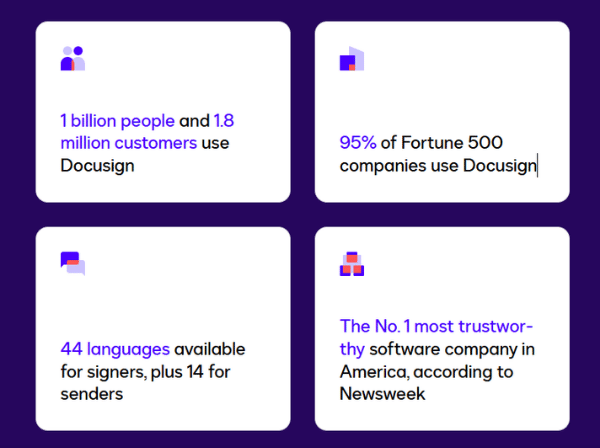
No online platform can honestly be described as 100% hacker-proof. However, DocuSign is designed with enterprise-grade security controls to reduce risk, protect documents and provide strong auditability.
Docusign’s product security information describes controls such as two-factor authentication, DDoS mitigation, intrusion detection and prevention, third-party penetration testing, AES 256-bit encryption, role-based authorisation, audit trails and Certificates of Completion.
DocuSign security features may include:
- Encryption in transit and at rest
- HTTPS and secure transfer protocols
- AES 256-bit encryption
- Multi-factor authentication options
- Role-based access control
- Certificate of Completion
- Secure cloud infrastructure
- Identity verification options depending on plan